Data Horizon Wheels
To begin with we looked for a database that related to the topic of automobiles, the database was taken from the Kaggel page.
When reviewing the Excel data I could see that the data was poorly structured, therefore, I made some arrangements within the file and then went on to perform an ETL in the Alteryx program.
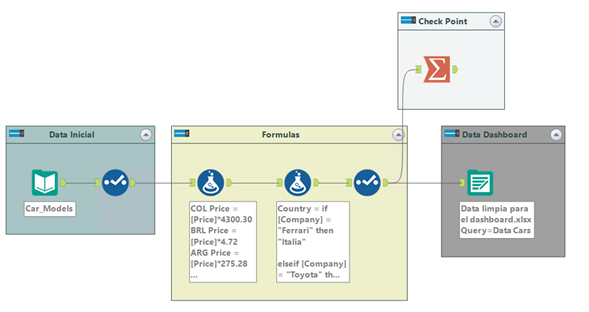
In the first part is the Initial Data where we place directly the Excel file, I placed a Select to identify the variables that interest me and what format they have, we continue with the creation of two formulas.
In the first formula what is planned is to see the price of cars in 4 other countries which are: Colombia, Brazil, Argentina and Mexico, each with a corresponding TRM.
In the second formula what was done is to create the variable Country as it is a fundamental variable to identify the country of the company, with that you could make a comparison between companies in the same country and number of companies per country.
Finally I have a part of Check Point to be able to check if the formulas were well and the Data Dashboard which is the data that will be saved to go directly to a visualization tool such as Tableau, Power BI, Data Studio or Qlik Sense.
Creation of Dashboard
It is good to make a recognition of the variables that compose the data that will be used for the dashboards:
Country: it shows the corresponding countries where the car brands were created.
Company: Car company.
Model: Shows the different models of cars in each company.
Horsepower: It is the horsepower that each car model has.
Torque: It is the amount of force necessary to produce a rotational movement.
Transmission Type: The number of gears a car has.
Drivetrain: The type of transmission in an automobile.
Fuel Economy: It is the economy of the car.
Number of Doors: The number of doors of each car.
Model Year Range: The period of time it was on the market.
Body Type: We are talking about the type of bodywork.
Engine Type: It is the type of engine of each car.
Number of Cylinders: It is the number of cylinders that the engines have.
Price: The price of each car in dollars.
COL Price: It is the price of each car in Colombian pesos.
BRL Price: The price of each car in Reais.
ARG Price: It is the price of each car in Argentinean pesos.
MXN: Price: It is the price of each car in Mexican Pesos.
The country of reference of each car did not appear in the original database, therefore, it was necessary to investigate and create the variable "Country" with the corresponding country of each car, with this it was possible to create a filter by country.
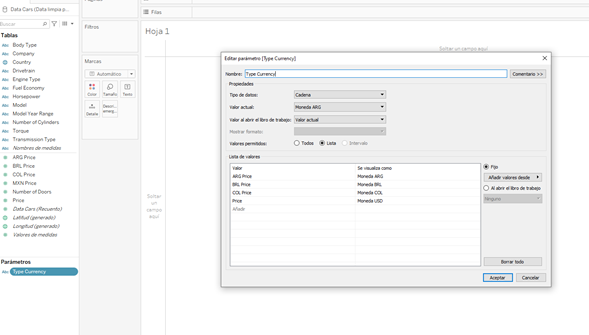
Continuing we created a parameter with the name "Type Currency" where we placed the different corresponding currencies such as Brazil, Argentina, Colombia and the United States, so that the user can visualize the price that best suits him/her.