Web Scraping
Business Case – GE
Context
A growing fintech company is looking to scale its B2B lead acquisition process. Currently, much of this task is done manually: team members search for companies on public sites (such as online directories or chambers of commerce), copy the information into spreadsheets, and then follow up commercially.
This process presents two major problems:
1. Volume: few leads are generated per week.
2. Low quality: leads do not always meet key criteria such as industry, size, or country.
The goal is to automate this first stage to generate a broader, cleaner, and more useful lead base for sales and marketing teams.
Part 1 – Strategic Approach
If you were assigned this project as the person in charge, how would you approach it?
To begin with the strategic approach, it is important to understand the main issues that are occurring. In this case, they are insufficient volume and low-quality leads. The appropriate path to address these issues is to first contact the team that is performing this search, see how they are developing it from the start, and determine exactly where they are failing. Once the step where they are failing is identified, our team can step in to improve certain functions automatically.
Everything that is done manually—such as searching for companies on public websites and copying the information into templates—can be transformed. For the team performing these tasks, it may feel very repetitive because they may find large volumes of data, and reviewing them one by one can lead to mistakes and wasted time, essentially creating a bottleneck.
First, we must solve the initial problem, which is the insufficient volume. We need to request a meeting with the team to understand the steps they are following, have them share the websites where they obtain the information, and specify which variables or data they are using—such as contact information, company name, company link, company description, among other variables. By understanding what is needed, I can begin developing a Python script using different libraries depending on the website, to automate the data download, reducing time by 80%. This will allow us to obtain a greater volume of data and reach more leads per week.
Second, we have the issue of low-quality leads. When downloading the data, the team is not keeping in mind the corresponding criteria such as industry, size, or country. Therefore, we should create a criteria dictionary that establishes which industries we should target, the minimum company size we should consider, and the countries we are interested in contacting. By having a well-defined and team-approved criteria dictionary, we can perform a much deeper data cleaning process using Python, SQL, or Alteryx to execute a complete ETL process. This will allow us to present the data in a dashboard, where they can see the number of companies per country and other relevant information so that contacting companies becomes more efficient and leads can be improved per week.
Part 2 – Technical development
Develop a Python script that:
● Goes to https://www.amarillas.cl.
● Searches for the following categories: “Importacion,” “Exportacion,” “Comercio.”
● Automatically scrolls through all the results pages.
● Extracts the data you consider relevant for evaluating the quality of the lead for each company (free choice of fields).
● Generate an Excel file with: Leads sheet and Dictionary_fields sheet
● Design a simple lead scoring scheme to prioritize the leads obtained.
● Define criteria and weights based on the data you collected.
● Calculate a numerical score for each lead and add the following columns to the leads sheet: Score (0–100 suggested) and Reason_score (brief explanation of what factors drove the score)
● Sort the leads by Score and identify the Top 25.
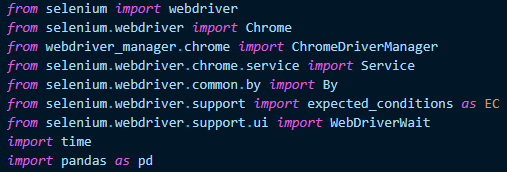
To perform web scraping, we will use the Selenium library together with the webdriver-manager library. We must also import time so that when we run the script, we can see the result at the end. Finally, we import pandas to perform data manipulation.
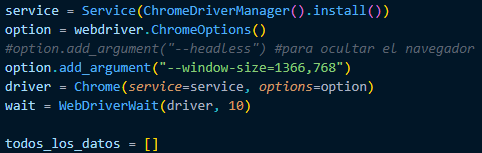
We have to create the main list that would be.

We need to create a browser, so in this script we will install the latest version of Chrome and instruct it to open with certain specifications. Finally, we create a variable where all the data obtained will be stored.
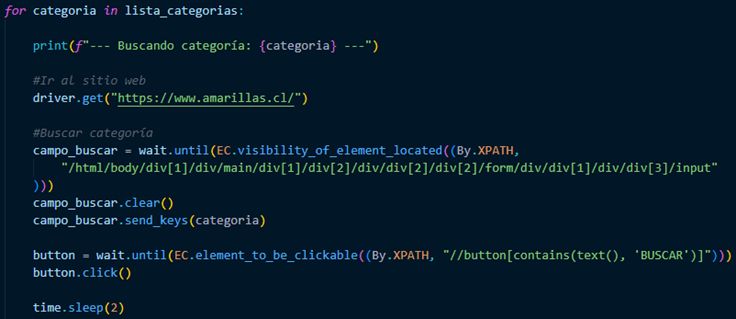
At this point, we must consider that we need to search for three categories, so we must create a for loop and, within this loop, begin to call the URL and add the categories to search for.
When we find the categories, we must extract the most important data, such as Name, URL, Information, and cell phone number. When we find this data, we must identify it with its category and save it in the corresponding variable.
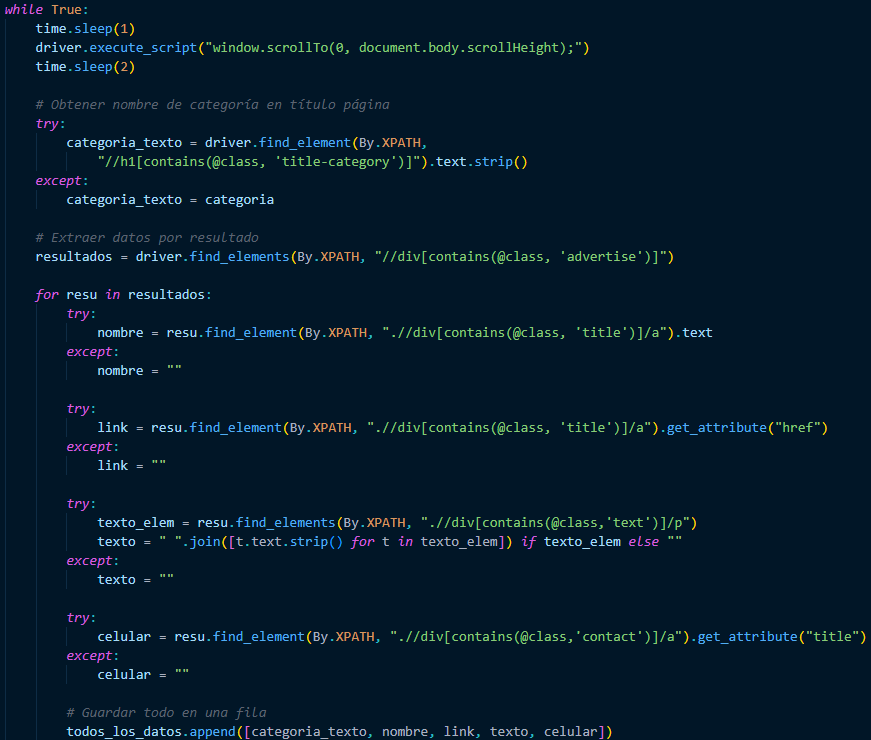
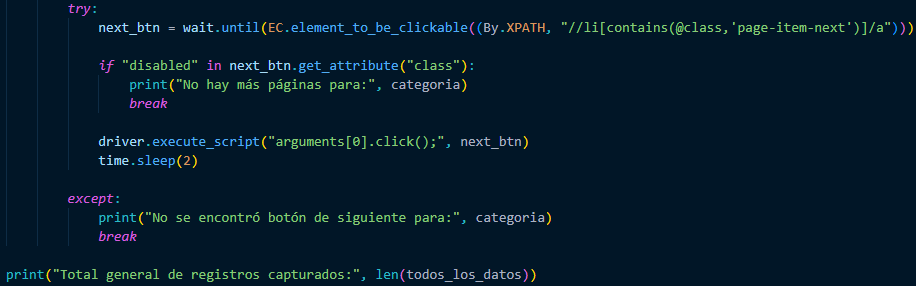
We already have the data from the first page. Now we need you to click on the next button to bring us the rest of the data. When you can't find the button, stop and send us a message saying “No more pages” for the category type, and it will give us the total number of records captured.
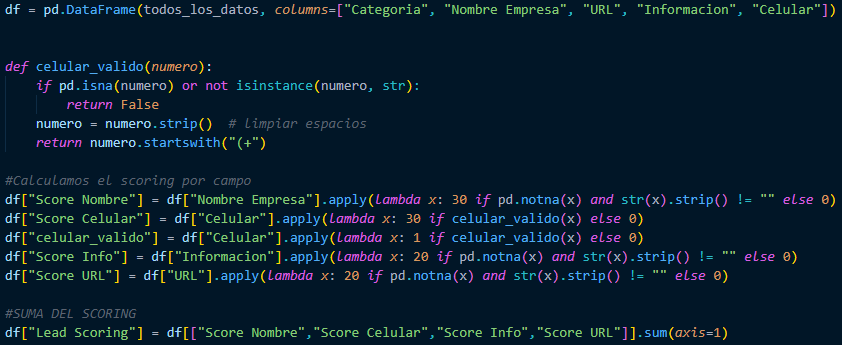
Now, to finish, we need to use the pandas library to create the lead scoring, where we will assign scores to the variables that contain data. However, for the Name and Cell Phone columns, we gave them a weight of 30, and for the Information and URL columns, we gave them a weight of 20. If there is no data, it will assign a value of 0. Finally, we have to add up the Lead scoring.
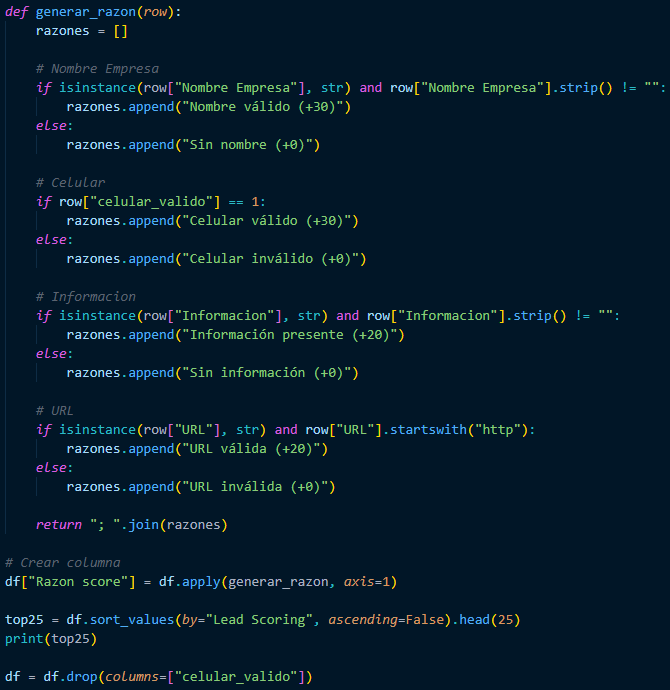
We must define why that lead scoring value was obtained, so we have to place each column where, if the data is not empty, then put Valid Name (+30), and if the opposite is true, then put No Name (+0). This applies to all columns that were given a weight. Finally, create a column to store the result, and then organize the data to obtain the top 25.
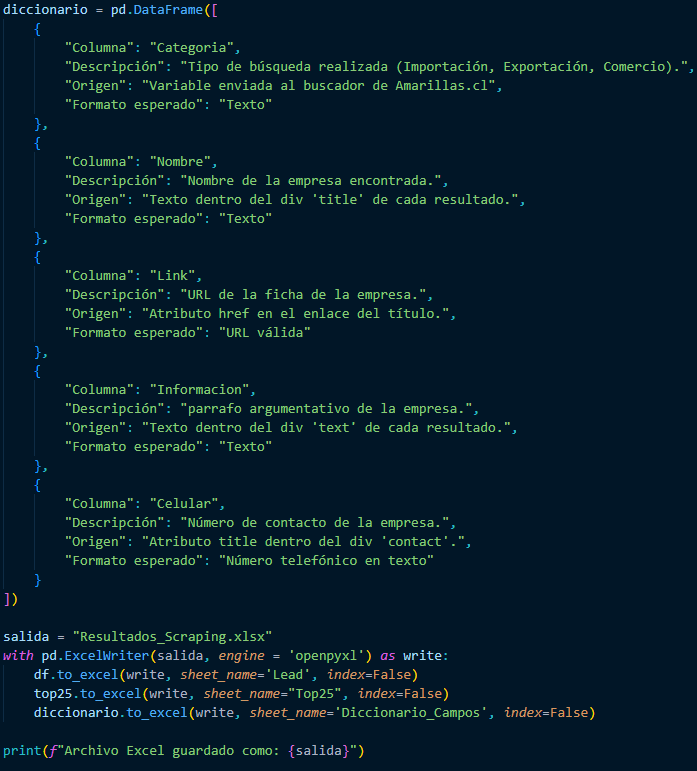
For the last step, we create a variable containing the dictionary explaining the previous columns so that the person who has to enter the data can understand the column, description, origin, and expected format. We create our Excel file, which will have three sheets: the first contains all the data with the lead scoring, the second is the top 25, and the third is the dictionary.